Elmo Calls by Sesame Street
3.71.39KReviews
Analysis ByAppCompare
Elmo Calls is the kind of children’s education app that turns a phone into a small moment of connection. Instead of asking a child to work through a lesson menu, it presents the idea of receiving a call from Elmo, which makes the experience feel more like a playful interruption to the day than formal screen time. I found that simple framing important: younger children often respond more warmly to a familiar character speaking directly to them than to an ordinary educational exercise.
Developed by Sesame Workshop, this free app sits in the education category and is suitable for Everyone. It has been available since April 19, 2013, and the current version is 4.9. On Google Play, it has passed five million installs, with an average rating of 3.7 from around ten thousand ratings and about one and a half thousand written reviews. Those figures suggest a widely recognized app with a mixed but generally interested audience rather than a flawless experience.
My overall impression is that Elmo Calls works best as a short, supervised activity for preschool-age children, especially when a parent wants to encourage listening, speech, or simple interaction without opening a full learning platform. It is not a replacement for a structured curriculum, and it may disappoint families expecting a large collection of games, progress reports, or a richly customizable learning system. Its appeal comes from immediacy and familiarity.
How the call changes when the connection matters
The app’s central idea depends on a timely moment
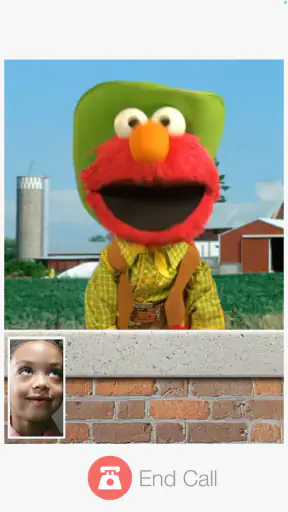
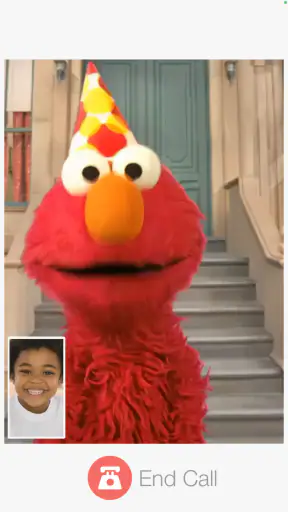
The experience is built around the excitement of a call. That matters because a call feels temporary and personal: a child hears from Elmo, reacts, and then the moment ends. In practice, this makes the app easier to introduce than an open-ended video library. I can imagine handing a phone to a child and saying that Elmo is calling, rather than asking the child to choose something from a crowded home screen.
Connectivity shapes that moment more than it might seem. When the app needs to load content or establish the expected interaction, a reliable connection helps preserve the illusion that something special is happening right now. A delay before the call begins can weaken the excitement, particularly for a child who is already waiting and asking why Elmo has not appeared. I would therefore open the app before presenting it as a surprise, especially on a mobile connection that may be inconsistent.
This is one of the less obvious strengths of the format: it gives parents a natural stopping point. A conventional video can lead to repeated viewing, autoplay, or arguments about when to stop. A call feels more bounded. That does not guarantee a short session, since a child may want another interaction, but the basic structure is easier to use as a small break between activities.
What a child actually gets from the format
For a young child, the value is not only the character’s presence. A direct address can encourage the child to answer aloud, pay attention to a question, or repeat a word. Those are modest goals, but they are more realistic than expecting a phone app to teach broad reading or mathematics skills by itself. I would use it alongside conversation with an adult, not as a substitute for that conversation.
The Sesame Street connection also gives the app a recognizable tone. Children who already know Elmo may understand the social invitation immediately, while children unfamiliar with the character may need a little help understanding what is happening. Parents should watch the first use rather than assuming every child will react in the same way. Some children enjoy pretend calls; others prefer direct games where they control every action.
The free download lowers the barrier to trying it, although in-app purchases range from ninety-nine cents to six dollars and ninety-nine cents per item. I would check the purchase flow before letting a child use the phone alone. That is not because every family will encounter a problem, but because a child-focused app should be treated like any other app with optional paid content: parental controls and supervision remain sensible.
Why a phone is useful in some places and awkward in others
Elmo Calls makes the most sense in mobile situations where a brief, familiar activity is useful. A parent might use it while waiting for an appointment, during a quiet transition before dinner, or on a short trip when a child needs reassurance and a little distraction. The call concept is more personal than handing over a random clip, and it can give the child something to anticipate.
However, a phone is not always the best screen for this kind of interaction. On a small display, a child may hold the device too close, tap accidentally, or become more interested in leaving the app than listening. In a busy environment, background noise can also make a spoken exchange harder to follow. I prefer using it in a calm corner rather than treating it as a solution for every difficult moment in public.
A useful routine is to prepare the phone before the child receives it. Lowering distractions, checking the volume, and making sure the battery is sufficient can prevent the app from becoming a source of frustration. If the child is already tired or overstimulated, the novelty of a call may not help. In that situation, a quiet book, an audio story, or direct attention from an adult may be a better choice.
A realistic everyday scenario
Imagine a parent waiting with a four-year-old before an appointment. The child is restless, the waiting room is quiet, and the parent wants to avoid opening a long video session. I would start Elmo Calls while connected to a dependable network, let the child see that Elmo is calling, and stay nearby to respond to the child’s reactions. After the interaction, I would ask what Elmo said or invite the child to repeat a word. That small follow-up turns passive phone time into a shared language activity.
The same situation also shows the app’s limits. If the call fails to load, the child may not understand that the problem is technical. If the parent has promised a call and then has to troubleshoot, the emotional effect can be worse than simply offering another activity. I would avoid presenting it as a guaranteed distraction until I had tested it on that particular phone and connection.
Handling interruptions, recovery, and everyday data concerns
What happens when the network is unreliable
Connectivity problems are especially noticeable here because the app’s main idea is immediate contact. A slow connection can turn a playful “Elmo is calling” moment into waiting at a loading screen. A dropped connection may interrupt the flow or require the parent to restart the experience. Even a short pause can matter when the intended audience is very young and has little patience for technical explanations.
My practical advice is to test the app at home before relying on it elsewhere. Try the parts you expect to use, then close and reopen the app so you know what the starting experience feels like. This is not a guarantee that every future session will behave identically, but it gives you a better sense of whether your phone and network handle the app comfortably.
If a call does not begin, I would avoid repeatedly tapping the screen while the child watches. Instead, I would pause, check the connection, and restart only once. Repeated taps can make it harder to tell whether the app is responding or whether several actions have been queued. If recovery takes more than a moment, I would move to a backup activity rather than letting the child associate Elmo with a frustrating wait.
Recovery is part of the parenting workflow
The best way to use a connection-sensitive children’s app is to treat it as one option in a plan, not as the entire plan. Keep a book, a simple conversation game, or a familiar offline activity available. That approach is useful even when the app normally works well, because real-world mobile conditions change between home Wi-Fi, public networks, and cellular service.
There is also a social recovery strategy. If the child becomes upset when the call stops, the parent can continue the pretend-play idea without pretending the technology is still working. Ask the child what Elmo might say next, invite a stuffed animal to make a call, or repeat a favorite part from memory. In my view, this is where an adult adds value that the app cannot provide: the experience can continue as conversation even when the connection cannot.
Families should also remember that the app runs on devices using Android 8.0 or later. That makes checking the phone’s operating system worthwhile before planning around it. A compatible device is only the first step, though; available storage, battery condition, network quality, and the child’s comfort with the phone all affect the real experience.
Using it without wasting mobile data
Because the app’s network behavior may matter during mobile use, I would be cautious about making it part of a daily cellular routine without first observing how the phone behaves. The safest approach is to use it mainly where the connection is dependable and to monitor the device’s data settings if your plan is limited. I would not assume that every part of the experience behaves the same way across networks or that a previous successful session guarantees the next one will be equally smooth.
Parents can also reduce surprises by keeping the app out of a child’s unsupervised browsing routine. The goal is not only to manage data use; it is to keep the phone focused on the intended activity. A child who can freely switch between apps may leave the call experience, open unrelated content, or trigger a purchase prompt elsewhere on the device. A restricted child profile or device-level purchase protection is sensible when available.
The optional purchases deserve the same attention. Since individual items cost between ninety-nine cents and six dollars and ninety-nine cents, I would review what is offered before handing over the phone. The free starting point makes testing easy, but “free” should not be interpreted as permission for unrestricted access to the device’s payment process. This is a small step that prevents an avoidable surprise.
How it compares with ordinary alternatives
Compared with a standard educational video, Elmo Calls feels more interactive and more bounded, but it may offer less control over what happens next. A video platform usually provides a much larger library, yet that variety can make choosing difficult and can encourage longer viewing. I prefer this app when the goal is a brief character-led exchange rather than a long entertainment session.
Compared with a structured preschool learning app, it is lighter and easier to introduce. A structured app is usually the better choice when a parent wants visible progression, repeated practice, multiple subject areas, or a clear learning sequence. Elmo Calls is better suited to social engagement, listening, and a friendly transition between activities. Expecting it to function like a complete early-learning program would be unfair to the app and disappointing for the family.
Compared with a real video call with a relative, it is more predictable and does not require another person to answer. That convenience is useful, but it does not provide the genuine back-and-forth of a family conversation. If the child’s main need is reassurance or social contact, calling a trusted relative may be more meaningful. If the adult needs a short, familiar character interaction that can fit into a busy routine, this app has a clearer advantage.
Who should try it, and who should skip it
I would recommend Elmo Calls to parents of young children who already enjoy Elmo or Sesame Street and who want a simple educational activity for short mobile sessions. It is particularly appealing when a child benefits from hearing a familiar voice and responding aloud. The free entry point also makes it easy to test without committing to a subscription.
I would be more cautious for families seeking deep educational measurement, independent long sessions, or a completely predictable experience in places with weak connectivity. Children who dislike pretend phone conversations may not engage with the central idea, even if they enjoy other Sesame Street content. Older children looking for challenging lessons will probably outgrow the format quickly.
My final verdict is positive but specific: Elmo Calls is a charming companion for brief, supervised moments, not a full learning system and not a dependable replacement for human attention. Its strongest feature is the way a familiar character can make a small interaction feel personal. Its main weakness is that the same immediacy becomes fragile when loading or connectivity gets in the way. If you prepare the phone, stay nearby, protect purchases, and keep a backup activity ready, it can earn a useful place in a young child’s mobile routine.
FAQ
What is Elmo Calls by Sesame Street?
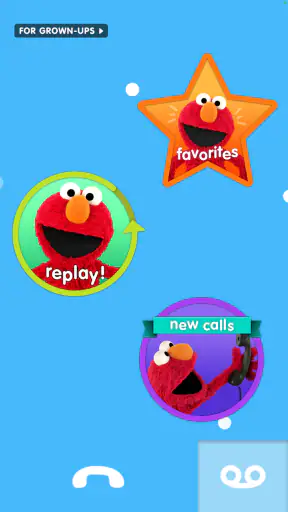
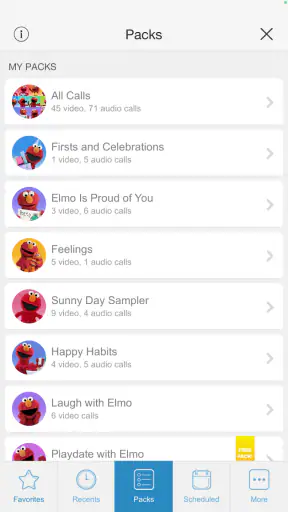
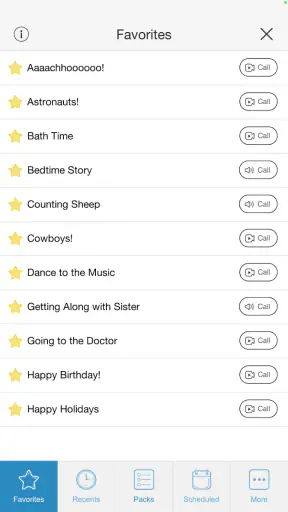
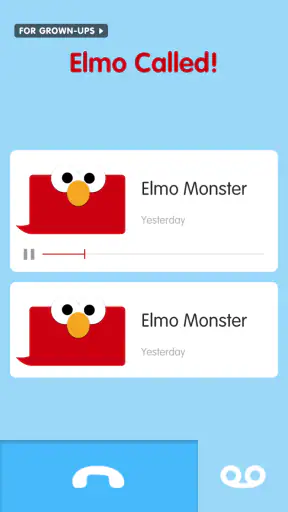
Elmo Calls is an interactive Sesame Street app that lets children receive pretend phone calls and voice messages from Elmo. The conversations are designed around playful learning, everyday routines, emotional support, and simple activities. After installing it, parents can choose from available call themes and let children respond to Elmo in a friendly, familiar format that feels like a real conversation without connecting to an actual phone service.
Is Elmo Calls suitable for young children?
The app is primarily designed for preschool-age children, especially those who already enjoy Sesame Street characters. Its short conversations, cheerful voice acting, and simple prompts make it easy for young users to follow. However, children develop at different speeds, so parents should explore the available content first and supervise initial use. The app works best as a shared activity rather than completely unsupervised screen time.
Does Elmo Calls require an internet connection or in-app purchases?
Requirements can vary depending on the version of the app and the device operating system. Some features or downloadable content may need an internet connection during setup, while previously installed material may work offline. Parents should also review the current store listing for pricing, optional purchases, and subscription details before downloading, because availability and payment conditions can change between Android and iOS releases.
Is Elmo Calls safe for children and does it collect personal information?
Elmo Calls is made for children, so privacy and parental controls are important parts of the experience. The app is intended to provide simulated calls rather than real communication with strangers. Even so, parents should read the current privacy policy, check permission requests, and review any links or purchase options before handing over the device. Avoid entering unnecessary personal information and keep the app updated.
What can children learn or practice with Elmo Calls?
The app uses Elmo’s conversations to encourage skills such as listening, speaking, recognizing feelings, following simple instructions, and completing everyday routines. Depending on the available call topics, children may be prompted to talk about emotions, healthy habits, bedtime, celebrations, or other familiar situations. It is not a replacement for preschool education, but it can be a fun way to reinforce positive behavior and parent-child conversations.
Pros
- Fun
- familiar Elmo voice makes calls appealing for preschoolers.
- Simple interface is easy for young children and parents to navigate.
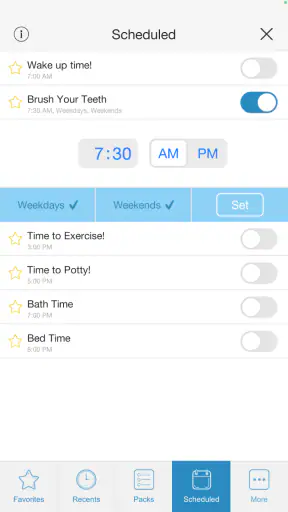
- Personalized messages can encourage routines like bedtime or brushing teeth.
- Short calls suit limited attention spans and quick interactions.
- Sesame Street characters add educational and emotional appeal.
Cons
- Most content is aimed at very young children
- limiting long-term use.
- Repeated messages may become predictable after frequent calls.
- Some features or call packs may require in-app purchases.
- Requires microphone and notification permissions for the full experience.
- Parents should supervise calls to manage screen time and expectations.